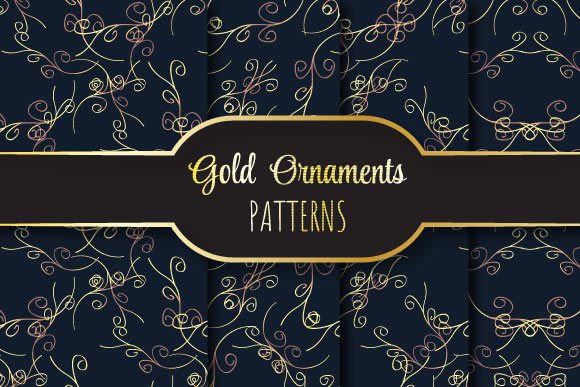
Gold Ornaments in Vector Design: Precision, Flexibility, and Timeless Elegance
When designers reach for ornamental elements that convey luxury, heritage, or ceremonial weight, Gold Ornaments consistently rise to the top. Not as literal metal—but as meticulously crafted vector motifs that emulate the luminous depth, intricate filigree, and regal symmetry of real goldwork. These aren’t decorative afterthoughts. They’re foundational assets—scalable, production-ready, and engineered for real-world use across print, branding, packaging, and digital experiences.
Why Vector Gold Ornaments Outperform Raster Alternatives
Raster files—like standard PNGs or low-res JPEGs—blur, pixelate, or lose fidelity the moment you scale them beyond their original dimensions. That’s unacceptable when applying a Gold Ornament to a 6-foot trade show banner or engraving it onto a wedding invitation at 0.25 inches tall. Vector formats eliminate that risk entirely.
The EPS 10 file included in this collection is built with clean Bézier paths, fully editable anchor points, and native support for spot color definitions—critical when preparing artwork for foil stamping or metallic ink printing. Unlike flattened AI or PDF exports, EPS 10 retains layer integrity and preserves transparency where needed, giving prepress teams full control over ink separation and overprint settings.
That’s why professional stationery designers, luxury packaging studios, and high-end invitation printers rely on vector-based Gold Ornaments. They don’t just look rich—they behave like premium assets throughout the production pipeline.
Seamlessly Repeating Patterns: More Than Just Backgrounds
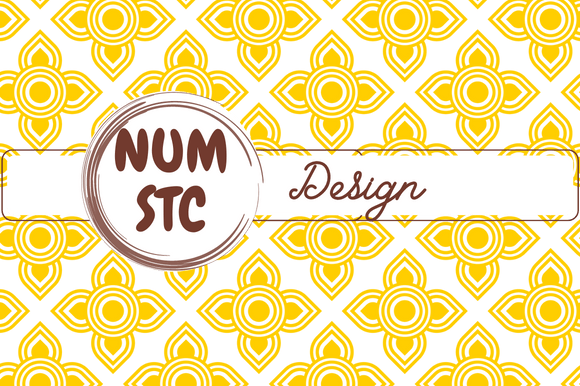
A seamless repeat isn’t just about tiling—it’s about invisibility. A well-constructed pattern disappears into the surface it covers, creating rhythm without distraction. These Gold Ornaments go beyond single motifs: each set includes a thoughtfully engineered 12 × 12 inch repeating tile (3600 × 3600 pixels at 300dpi), optimized for both digital and offset workflows.
Because the pattern aligns perfectly at all four edges—with no visible seams, shifts, or misaligned curves—you can extend it infinitely across fabric prints, wrapping paper, website backgrounds, or engraved metal surfaces. No manual cloning. No guesswork. Just plug it in and scale.
Designers working on wedding suites often use these repeats for envelope liners or monogrammed vellum overlays. Boutique skincare brands apply them to box wraps and tissue paper—subtle enough to feel artisanal, refined enough to signal craftsmanship. The repetition doesn’t shout; it whispers value.
What’s Inside the Zip File—and Why Each Format Matters
The package delivers one EPS 10 file plus four JPEG variants—each serving a distinct role in your workflow:
- EPS 10: Your master source file. Editable in Illustrator, compatible with legacy RIPs, and ready for direct output to platemakers or CNC engravers.
- JPEG @ 300dpi (CMYK): For print proofs, client presentations, or PDF embedding where color accuracy matters most.
- JPEG @ 300dpi (RGB): Optimized for web previews, mockups, or screen-based approvals—preserving luminosity and contrast.
- JPEG @ 72dpi (RGB): Lightweight version for email drafts, quick social media teasers, or internal mood boards.
- JPEG @ 150dpi (CMYK): A balanced option for mid-resolution press proofs or vendor handoffs where file size and fidelity must coexist.
This multi-format approach saves time—not just during initial use, but months later when you revisit the project. No re-exporting. No color profile guessing. Everything you need is structured, labeled, and purpose-built.
Real-World Applications Across Industries
Wedding & Event Design
Gold Ornaments shine brightest here—not just metaphorically. Think damask borders framing monograms on foil-stamped menus, or delicate acanthus repeats lining the edge of a linen napkin. Because each tile is precisely 12 × 12 inches at 300dpi, designers can map patterns directly onto physical print dimensions in layout software—no scaling math required.
Luxury Packaging
High-end perfume boxes, limited-edition book covers, or artisan chocolate wrappers benefit from tactile richness—even before touch. A subtle gold repeat printed via hot foil stamping adds dimensionality that flat CMYK can’t replicate. With the EPS file, designers define exact foil coverage areas, adjust stroke weights for crispness at small sizes, and lock registration marks for precision die-cutting.
Digital Branding & Web UI
Yes—even online. SVG conversion is effortless from the EPS source, allowing animated gold flourishes on hero sections or micro-interactions on hover states. The JPEG variants let developers preview how the pattern renders across devices before committing to code. And because the repeat is truly seamless, CSS background tiles perform smoothly—no stutter, no edge artifacts.
Technical Considerations Before You Use Them
Not all “gold” vectors are created equal. Here’s what to verify before dropping a Gold Ornament into your next project:
- Path cleanliness: Open the EPS in Illustrator and check for stray points, overlapping anchors, or unnecessary compound paths. This set uses minimal nodes—optimized for smooth scaling and fast rendering.
- Color definition: Does it default to process gold (C=0 M=15 Y=100 K=10) or a true Pantone? This collection includes both options—labeled clearly—so you choose based on your printer’s capabilities.
- Stroke vs. fill logic: Ornamental lines should be strokes—not outlined shapes—whenever possible. That ensures uniform weight at any scale. All lines here are stroked, not expanded.
- Transparency handling: Some ornaments rely on soft blends or gradient meshes. These files avoid raster effects entirely—keeping everything vector-native and RIP-safe.
If you’ve ever wrestled with a “gold” pattern that turned muddy on press or collapsed at thumbnail size, these details explain why. It’s not about aesthetics alone—it’s about engineering intention.
Workflow Integration Tips
You don’t need to overhaul your process to benefit from these Gold Ornaments. Start small:
- In InDesign: Place the EPS directly into a master page frame. Set it to “Tile Fill” mode and adjust scale non-destructively.
- In Photoshop: Use the JPEG @ 300dpi (CMYK) as a smart object. Apply layer masks or blend modes to isolate ornament sections without degrading quality.
- In Figma or Sketch: Convert the EPS to SVG using Illustrator’s export function, then import as a vector component. Resize freely—no pixelation, no asset management headaches.
- For embroidery or laser cutting: Import the EPS into CorelDRAW or AutoCAD. Paths remain intact for toolpath generation—no redrawing needed.
And because every file is sized to 12 × 12 inches at true 300dpi, you’ll never second-guess resolution warnings in your output dialogues. It just works.
Final Thought: Ornamentation Is Strategy, Not Decoration
Choosing the right Gold Ornaments isn’t about picking something that “looks nice.” It’s about selecting an element that carries weight—literally and symbolically. Gold signals attention, care, and permanence. When embedded in a seamless vector pattern, it becomes infrastructure: quiet, reliable, and endlessly adaptable.
Whether you’re designing a certificate of authenticity for a fine art print, laying out a heritage brand’s holiday campaign, or building a UI for a private banking app—the underlying geometry, scalability, and production readiness of these files shape how seriously your work is taken. That’s the difference between decoration and design intent.