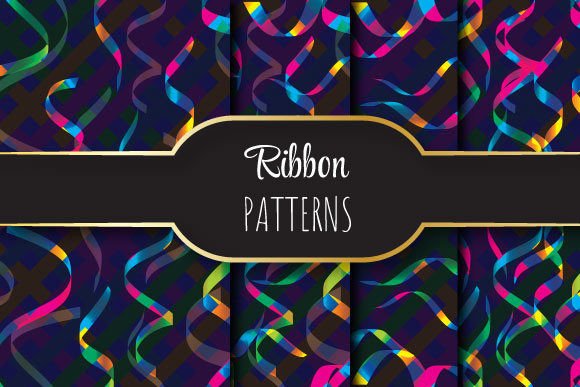
Colorful Ribbons: Bold, Seamless Vector Patterns
Colorful Ribbons is a tightly crafted set of vector pattern files designed for real-world creative work—not just decoration, but functional visual infrastructure. Each pattern repeats flawlessly across any surface, whether you’re wrapping a product box, designing a presentation slide, or building a brand’s digital backdrop. At 12 × 12 inches (3600 × 3600 pixels, 300 dpi), these files deliver print-ready clarity without pixelation or edge breaks. The EPS 10 format ensures full editability in Adobe Illustrator and compatibility with professional prepress workflows—no raster limitations, no scaling compromises.
Why Seamless Repetition Matters More Than You Think
A truly seamless pattern doesn’t just look continuous—it behaves predictably. When you tile Colorful Ribbons across a large banner or repeat it down a fabric swatch, there are no visible seams, no color shifts at the edges, and no distortion when scaled. That reliability saves hours: no manual patching, no trial-and-error alignment, no last-minute fixes before client delivery. It’s especially valuable for designers working under tight deadlines or non-designers who need polished results without deep software expertise.
The zip package includes one fully editable EPS file plus four high-res JPEGs—ideal for quick previews, mockups, or platforms that don’t support vector uploads (like some social media tools or CMS editors). That combination gives you flexibility without sacrificing quality: use the EPS to recolor, resize, or integrate into complex layouts; use the JPEGs for fast drag-and-drop placement in Canva, PowerPoint, or email templates.
Creative Uses Across Real Projects
Colorful Ribbons isn’t locked into one style or use case. Its energy comes from versatility—how easily it adapts to different tones, formats, and audiences:
- Branding & Identity: Use a single ribbon motif as a subtle border on business cards or letterheads—or scale it up as a vibrant background for an About Us page. Try desaturating one version for a more refined look, or boost contrast for bold event signage.
- Educational Materials: Teachers and course creators apply these patterns to worksheet headers, slide dividers, or printable certificates. The repetition adds visual rhythm without competing with text—especially effective for younger learners or neurodiverse audiences who benefit from consistent, predictable design cues.
- Product Packaging & Merchandise: Wrap a gift box, line a notebook interior, or screen-print onto tote bags. Because each file is 300 dpi and vector-based, you maintain crisp detail whether printing at 2 inches wide or 4 feet tall.
- Digital Interfaces: While not intended for UI elements like buttons or icons, Colorful Ribbons works well as a hero-section background, newsletter divider, or section separator in landing pages—adding texture and personality without slowing load times (thanks to the lightweight EPS + optimized JPEG options).
Tailoring the Patterns for Your Audience
Who you’re designing for changes how you use Colorful Ribbons—and that starts with intentional adaptation, not just application.
For small business owners: Pair a warm-toned ribbon with clean sans-serif typography to signal approachability and craft—ideal for handmade goods, wellness services, or local cafes. Avoid overloading the layout; let the pattern breathe behind a short headline and strong call-to-action.
For educators and nonprofits: Choose higher-contrast combinations (e.g., navy + gold, charcoal + coral) for accessibility. Test readability by overlaying white or light gray text at 18–24 pt—then adjust opacity (10–20%) if needed. These patterns add visual interest without overwhelming mission-driven content.
For freelancers and agencies: Keep a renamed, organized folder of your edited versions (e.g., “Ribbons_Coral_LightOpacity,” “Ribbons_Navy_BoldScale”). That saves time across client projects and helps maintain brand consistency when reusing assets across proposals, pitch decks, or case studies.
Staying Clear, Consistent, and Original
Using a ready-made pattern doesn’t mean sacrificing originality—it means working smarter. The key is thoughtful integration, not passive insertion.
Start by asking: What role does this pattern play? Is it framing? Emphasizing? Calming? Energizing? If it’s supporting a message, keep it subtle—lower opacity, reduce saturation, or crop to a narrow band along one edge. If it’s setting a mood (e.g., celebration, curiosity, growth), match its rhythm to your content: faster repeats for energetic topics, wider spacing for calm or elegant contexts.
To preserve clarity, avoid layering multiple busy patterns in one layout. Let Colorful Ribbons be the sole textural element—then balance it with ample whitespace, strong typography hierarchy, and purposeful color blocking. And always preview at actual size: zoom out to 25% in Illustrator to check tiling integrity, or print a 4×4 inch test swatch before committing to full production.
Getting Started Without Overcomplicating It
You don’t need advanced vector skills to begin. Here’s a practical starting sequence:
- Open the EPS in Illustrator → Object > Expand Appearance (if effects were applied) → ungroup to access individual ribbons.
- Use the Eyedropper tool to sample colors from your brand palette, then recolor strokes and fills in seconds.
- For web use: export a JPEG at 72 dpi and 1920px width for full-width backgrounds, or save as PNG-24 with transparency for overlays.
- For packaging mockups: place the JPEG into Photoshop, then use Edit > Transform > Distort to wrap it convincingly around a 3D box template.
Remember: inspiration follows action—not the other way around. Pick one project where a pop of structured color would improve cohesion or engagement. Open the file. Adjust one thing—color, scale, or placement. See how it changes the feel. Then refine from there.
Colorful Ribbons works because it respects your time, your tools, and your audience’s attention. It’s not about adding “more” to your design—it’s about adding *intention*. Whether you’re launching a new service, preparing a classroom resource, or refreshing your portfolio, these patterns give you a reliable, expressive foundation—ready to adapt, not replace, your voice.