Shiny Stars: A Practical Guide to Seamless Vector Star Patterns
Shiny Stars is a curated digital asset designed for designers, print professionals, and crafters who need high-fidelity, infinitely tileable star motifs. Unlike generic star graphics or raster-based clipart, Shiny Stars delivers a precisely engineered vector pattern—built to repeat without visible seams across any surface, from fabric swatches to large-format wall murals. Its defining trait isn’t just visual appeal, but functional reliability: each pattern aligns mathematically at its edges, ensuring continuity whether scaled up for signage or reduced for embroidery guides.
What Sets Shiny Stars Apart
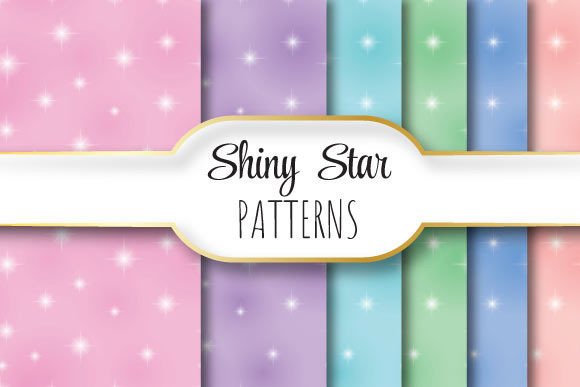
At its core, Shiny Stars is a single EPS 10 file paired with six JPEG variants—all rendered at 3600 × 3600 pixels on a 12 × 12 inch canvas at true 300 dpi. That resolution isn’t arbitrary. It reflects real-world production needs: enough pixel density for offset printing, screen printing, and fine-art giclée, while the EPS foundation preserves scalability for vector workflows in Adobe Illustrator, CorelDRAW, or Affinity Designer. The inclusion of JPEGs serves practical flexibility—quick previews, web mockups, or direct use in layout tools that don’t support EPS natively.
The “shiny” element refers not to glitter effects, but to intentional contrast and luminance control. Each star shape is outlined with subtle gradient transitions and carefully balanced negative space—designed to hold detail under halftone screening and avoid moiré when overlaid with other patterns. This differs from flat-color vector stars, which often lose definition when printed on textured substrates or converted to spot-color separations.
How It Compares to Other Pattern Options
When evaluating repeating star patterns, users typically encounter three broad categories: hand-drawn raster tiles, algorithmically generated SVG patterns, and professionally authored vector assets like Shiny Stars. Each has tradeoffs.
- Raster-based tiles (e.g., PNG or TIFF repeats) are easy to preview and embed but degrade when scaled beyond their native resolution. A 1200 × 1200 px raster tile may look crisp on a business card—but blur noticeably on a 48-inch banner. Shiny Stars avoids this entirely by anchoring its design in vector geometry.
- SVG pattern generators offer customization—adjusting star count, rotation, or spacing on the fly—but rarely guarantee seamless tiling at print resolutions. Many rely on browser-rendered CSS transforms or approximate offsets, introducing micro-gaps or alignment drift that only become visible under press inspection.
- Commercial vector packs often bundle dozens of isolated star icons or borders, requiring manual tiling or scripting to achieve repetition. Shiny Stars skips that step: the pattern is pre-aligned, tested, and delivered as a ready-to-place tile unit.
This distinction matters most in time-sensitive or precision-critical contexts—like preparing textile repeats for a fashion line’s seasonal launch or building brand-consistent packaging backgrounds where misaligned elements would require costly rework.
Strengths and Real-World Fit
Shiny Stars excels where consistency, fidelity, and production readiness intersect. Its strengths include:
- Print-ready integrity: The 300 dpi raster JPEGs match industry standards for CMYK prepress; the EPS file retains editable paths, layers, and Pantone-compatible color definitions.
- Workflow efficiency: Designers can drop the EPS into an Illustrator artboard, define a pattern swatch in seconds, and apply it across complex shapes—no scripting or plugin dependencies.
- Adaptability across scales: Because the vector core doesn’t rely on embedded raster effects, it renders cleanly whether used at 1% scale (for micro-embroidery templates) or 300% (for architectural wall graphics).
A graphic designer creating stationery for a luxury wedding brand might use Shiny Stars to build a subtle background texture behind foil-stamped typography—knowing the pattern won’t pixelate during plate-making. A product photographer could overlay a low-opacity JPEG version onto a white backdrop to add depth without distracting from the subject. In both cases, the value lies in predictability—not novelty.
Limitations and When to Look Elsewhere
Shiny Stars isn’t built for maximalist expression. It prioritizes subtlety and structural integrity over bold stylistic variation. If your project calls for:
- Animated or interactive star patterns (e.g., for websites or apps), SVG or Lottie formats would be more appropriate;
- Customizable parameters like randomized star size, rotation, or color per instance, parametric tools or generative scripts offer greater flexibility;
- Non-repeating, illustrative star compositions (e.g., constellations with labeled stars or narrative arrangements), then a bespoke illustration or icon set better fits the need.
Similarly, if your output medium is exclusively digital—such as social media banners sized for Instagram or email headers—lightweight PNGs or CSS-based patterns may reduce file bloat without sacrificing visual quality. Shiny Stars’ emphasis on print-grade fidelity means its assets carry more data than necessary for those use cases.
Decision Factors: Matching the Tool to the Task
Choosing whether Shiny Stars fits your workflow depends less on preference and more on context. Ask yourself:
- What’s the final output? If it’s physical—fabric, packaging, signage, or fine art prints—vector-backed, seam-free repetition is non-negotiable. Shiny Stars meets that bar directly.
- How much control do you need over individual elements? If you must edit each star’s fill, stroke, or layer order independently, working from a grouped EPS may require ungrouping and reorganizing. A fully layered AI file would offer more granular control—but Shiny Stars trades that for tighter tiling assurance.
- Is consistency across multiple projects important? Teams using Shiny Stars across branding guidelines, merchandising, and environmental graphics report fewer revision cycles because the pattern behaves identically in every application—unlike manually tiled alternatives prone to human alignment error.
One interior designer we spoke with used Shiny Stars across three client projects: wallpaper for a boutique hotel, custom upholstery for a restaurant booth, and embossed foil stamping on menu covers. In each case, she reused the same EPS file—adjusting only color mode and scale—cutting setup time by roughly 40% compared to rebuilding patterns from scratch.
Practical Integration Tips
To maximize utility, consider these implementation notes:
- For Illustrator users: Drag the EPS into your document, select it, then choose Object > Pattern > Make. Adjust spacing and overlap in the Pattern Options panel—though the default settings usually require no modification.
- For Photoshop users: Open the JPEGs at full resolution and define them as pattern fills (Edit > Define Pattern). Use Smart Objects to preserve scalability when transforming layers.
- For cross-platform collaboration: Share the ZIP package intact—don’t extract files individually. The folder structure signals intent and prevents accidental omission of supporting JPEGs.
Also worth noting: While Shiny Stars uses standard CMYK and RGB color spaces, its EPS 10 format ensures backward compatibility with older versions of design software—no need to upgrade just to open the file.
Final Consideration: Value Beyond the Download
What makes Shiny Stars useful isn’t just what’s included—it’s what’s omitted. There’s no trial period, no subscription, no watermarked previews. You receive one clean, production-tested asset with clear technical specs and zero ambiguity about usage rights for commercial work. That transparency simplifies evaluation: if your need aligns with its capabilities, there’s little guesswork involved. If not, the constraints are equally clear—and that clarity itself saves time.
In an ecosystem crowded with “free” resources that demand hours of cleanup or premium bundles promising versatility but delivering inconsistency, Shiny Stars offers something quieter but equally valuable: reliability, measured in inches, pixels, and print runs—not marketing claims.